Cookies are used to enhance the functionality of this site. You may wish to view our privacy policy. To remove this banner and prevent its display in future, select the checkbox and press .

Share |

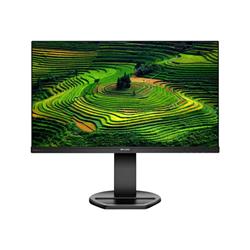
Philips 241B8QJEB/00 Review

Philips 241B8QJEB/00 Review. Please complete the form below

Email address:(Will not be displayed)
Display name:
Marks out of ten:
Your review:

Alternative Products

You may wish to consider these similarly priced products

Philips 242B1G/00 Philips 242B1G/00 from £151.56. **Super energy efficient** The eco-friendly Philips 24" monitor is designed for sustainable productivity. Super-energy-efficient design delivers a new level of power savings. PowerSensor and LightSensor further reduce energy use while delivering crisp visuals. **Super-energy-efficient design for maximum power savings** Using the new energy saving design with a super-efficient power supply, this monitor achieves a higher energy class, while giving excellent performance. The power-efficient feature uses new LED backlight technology which maintains brightness and colour using significantly less energy; this makes a big difference when using many monitors or even just one. **PowerSensor saves up to 80% energy costs** PowerSensor is a built-in 'people sensor' that transmits and receives harmless infrared signals to determine if the user is present and then automatically reduces monitor brightness when then user steps away from the desk, cutting energy costs by up to 80 percent and prolonging monitor life **IPS technology for full colours and wide viewing angles** IPS displays use advanced technology that gives you extra-wide viewing angles of 178/178 degrees, making it possible to view the display from almost any angle  even in 90-degree Pivot mode! Unlike standard TN panels, IPS displays gives you remarkably crisp images with vivid colours, making it ideal not only for Photos, films and web browsing, but also for professional applications that demand colour accuracy and consistent brightness at all times. **LowBlue Mode for easy-on-the-eyes productivity** Studies have shown that just as ultra-violet rays can cause eye damage, shortwave-length blue light rays from LED displays can cause eye damage and affect vision over time. Developed for wellbeing, the Philips LowBlue Mode setting uses a smart software technology to reduce harmful shortwave blue light. **TUV Eye Comfort certified to reduce eye fatigue** Philips displays meet TUV Rheinl
Startech.com ARMSTS Startech.com ARMSTS from £149.23. Turn your desk into a sit-stand workspace with easy height adjustment, for increased comfort and productivity. This sit-to-stand workstation lets you change your working position throughout the day, to enhance your comfort and productivity. The sit-to-stand desk workstation is designed to fit you and your needs throughout the day. With one touch, you can switch your position to sitting or standing, to keep a balanced level of movement. The workstation features an advanced pneumatic spring that provides effortless movement - you simply raise or lower the platform with one touch of the lever. You can easily adjust the standing desk to match your exact height requirements, instead of selecting from pre-determined heights. You can also adjust the tension according to the weight of monitors, laptops and other components on the platform, to make raising or lowering the workstation easy. Create a more ergonomic work environment at a fraction of the cost of a standing desk. This compact sit-to-stand workstation fits easily into your work space. You simply set the workstation on your desk surface, tabletop or another stable work surface (minimum 26" depth). The sit-stand workstation lets you make the most out of your desk area, and it's easy to integrate it into your current layout. It simply sits on your desktop. The workstation provides lots of space for writing notes or placing accessories on its base and a large keyboard tray that accommodates your keyboard and mouse, making it perfect for any workspace including business settings and home offices. Setting up your workstation is easy. You can place one monitor (from 12" to 30") directly on the stand. The sit-stand workstation is also compatible with StarTech.com monitor arms. If you prefer a dual-monitor setup, you can purchase the StarTech.com ARMDUAL Dual Monitor Mount with Articulating Arms, which supports two displays from 12" to 24". You can also create a single-monitor setup with the StarTech.com ARM
Philips 242B1H/00 Philips 242B1H/00 from £191.98. **Clear vision to get more done** This Philips monitor with a secure pop-up webcam with Windows Hello offers personalised and greater security. Loaded with features to improve productivity and sustainability. Eye comfort features with TUV certified to reduce eye fatigue. **PowerSensor saves up to 70% energy costs** PowerSensor is a built-in 'people sensor' that transmits and receives harmless infrared signals to determine if the user is present and automatically reduces monitor brightness when the user steps away from the desk, cutting energy costs by up to 70 percent and prolonging monitor life. **LightSensor for the perfect brightness with minimal power** LightSensor uses a smart sensor to adjust the picture brightness depending on the light conditions in the room for the perfect picture with minimal power usage. **IPS technology for full colours and wide viewing angles** IPS displays use advanced technology that gives you extra-wide viewing angles of 178/178 degrees, making it possible to view the display from almost any angle  even in 90-degree Pivot mode! Unlike standard TN panels, IPS displays gives you remarkably crisp images with vivid colours, making it ideal not only for Photos, films and web browsing, but also for professional applications that demand colour accuracy and consistent brightness at all times. **SmartImage pre-sets for easy optimised image settings** SmartImage is an exclusive leading edge Philips technology that analyses the content displayed on your screen and optimises your display performance. This user-friendly interface allows you to select various modes, like Office, Photo, Movie, Game, Economy etc., to fit the application in use. Based on the selection, SmartImage dynamically optimises the contrast, colour saturation and sharpness of images and videos for ultimate display performance. The Economy mode option offers you major power savings. All in real time at the touch of a single button! **Effortles
Asus MB165B Asus MB165B from £155.06. 15.6-inch portable USB-powered monitor with a single USB 3.0 cable for power and video signal transmission The slim and thin profile helps you get things done more efficiently when youÂre on the go User-friendly design with embedded tripod socket on the rear and foldable sleeve for versatility. Can automatically sense its orientation and switch the monitor between landscape and portrait modes.
Sitemap | T & C | Contact | Help | Blog
  • If you visit a product supplier by clicking on a link from this website and then make a purchase from the product supplier, we may receive payment, usually in the form of a small percentage commission.
Keen Price Finder